Free, open source Android app for Hermes Agent

Your phone's assistant should be one that knows you. That's Dudan.

Replace Gemini as your default assistant with Dudan. It connects your own Hermes Agent to your Android phone's side button. You talk to it. It talks back. It can use tools on your phone or remotely. Best of all? It's yours. Change it and run it as your own.

How it works

01 Voice

Give your agent a job. Out loud.

Hold the side button and dudan listens over the app you're using. Say what you need, then hear the answer. Tap "Ask about screen" to include a screenshot. No need to describe the weird thing you're looking at.

  • Summarize yesterday's meeting and list my tasks.
  • Finish the draft we started.
  • Which emails need an answer today?

02 Rich replies

Answers you can read and act on.

Long answers can turn into a wall of text in WhatsApp or Telegram. Dudan lays them out so you can find what matters and act on it. Pick an option, fill in missing details or tap a follow-up right in the reply, without typing another message.

03 Files

Put your agent to work on your files.

Share a meeting recording and ask for action points, or send a PDF and ask Hermes to check the details. Attach files straight from other Android apps. You can hand over the source material without copying it all into a message.

04 Approvals

Respects your existing approval settings.

Dudan follows the approval rules you've set in Hermes. When a command needs your permission, the job pauses and Dudan shows the request on your phone. Review the command and allow or deny it there, without going back to your computer.

05 Phone control

Ask on your laptop. Your phone sets the timer.

Tell Hermes "set a timer for ten minutes" in Telegram. The timer runs on your phone. With phone control enabled, it can also open apps and links, set alarms, control music and volume, and check your battery.

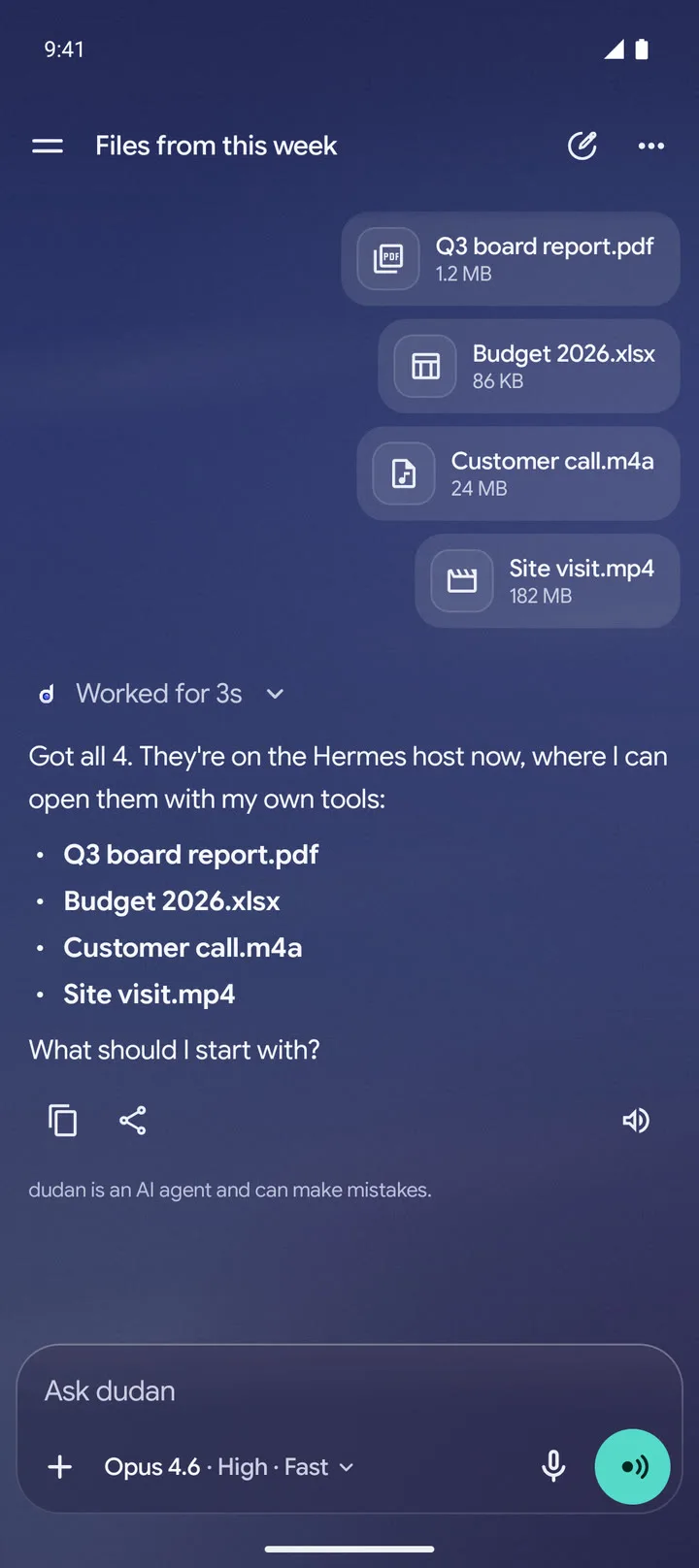
A PDF, a spreadsheet, a recording and a 182 MB video sent in one message, and the agent confirming it has all four on the Hermes host.

Why bother?

Doesn't Gemini do this already?

If Gemini does what you need, use it. dudan is for people who run Hermes and want that agent on their phone. The one they've already given tools, files and jobs to do.

Pick the model
Choose from the models on your Hermes server. Use a quick one for spoken questions and a different one for longer jobs. Change your mind whenever you like.
Connect your tools
Hermes runs on your own computer. Give it scripts, command-line tools and API access, and it can use them when you ask from your phone.
Own the setup
Your agent's memory, skills and chat history live on your server. You can read and edit them. dudan is open source too, so you can change the app.
Keep your agent
dudan connects to the Hermes you already use in Telegram or the terminal. Your existing tools and scheduled jobs come with it. Phone control works from those channels too.

The catch is setup. You run the server, connect the tools and fix things when they break. If that sounds like a pain in the arse, fair enough.

From the maker

Why it's called dudan

dudan comes from the Dutch "doe dan". Roughly, "Well, fucking do it then." That should give you a fair idea of the product strategy.

My Hermes processes recordings, prepares my morning brief, watches my inbox and builds software for me. Some jobs I ask for. Others run on a schedule. I've put time into giving it the tools and context to do useful work.

I built dudan so I could talk to that same agent from my phone. Hold the button, give it a job, get on with my day. I use it on my Galaxy Z Fold7, in Dutch and English. It's free and open source because you should be able to make it work your way too.

Bart van der Meeren, maker and impatient daily user.

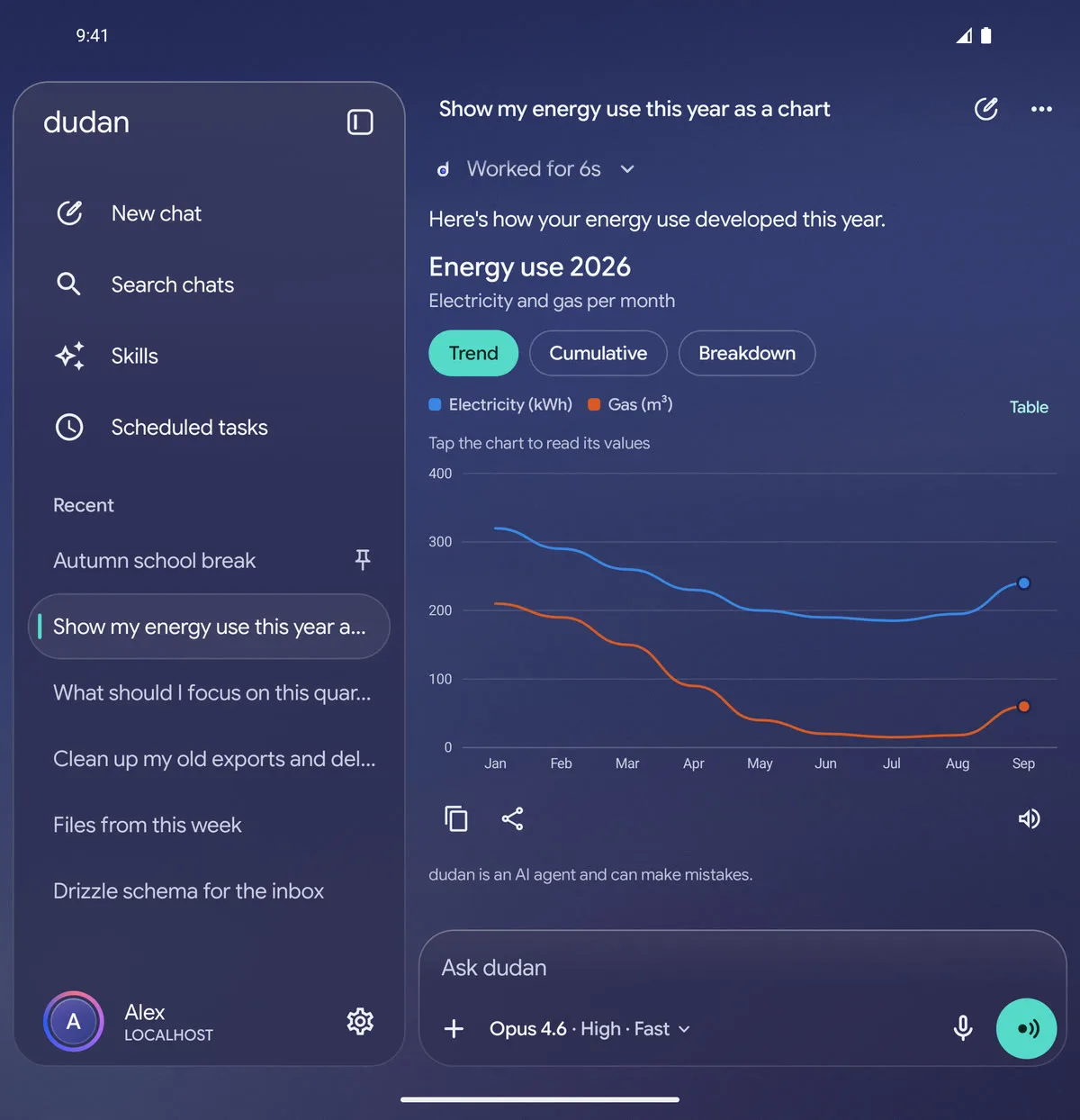
On a foldable's inner screen, the chat list sits next to a chat with a line chart of energy use.
Chat list on the left. Conversation on the right. Your foldable has the room.

Spec sheet

Voice
Hold the side button or use your phone's assistant gesture. "Ask about screen" attaches a screenshot. Live mode keeps the conversation going hands-free. Bluetooth headset mics work too.
Speech
Orukeet recognizes speech in 25 languages on your phone. Kokoro reads English replies; Supertonic 3 reads Dutch. Choose from 20 voices, or use the Android voice for other languages.
Models
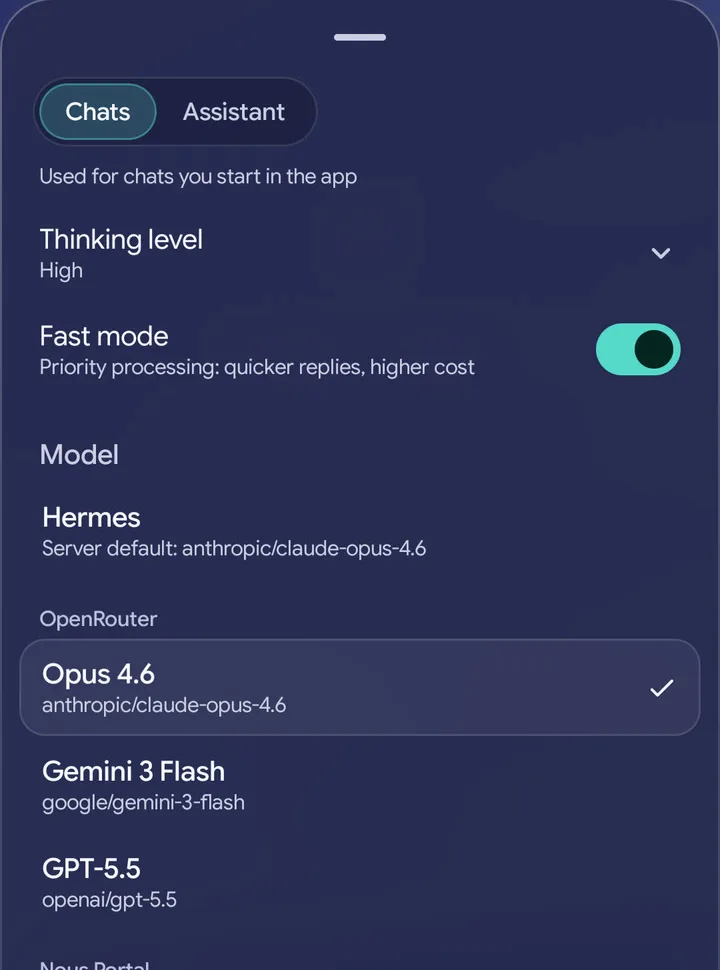
Pick from your Hermes server's models. Adjust the thinking level and use fast mode where supported. Set separate defaults for app chats and the side button.
Dropped connection
Text and file tasks keep running on your server, even when your phone loses signal. dudan catches up when you're back. Tasks with photos need the connection to stay up.
Chats
Search, pin and rename chats. Continue them in the Hermes dashboard or terminal, and show chats from other channels in dudan. Browse skills and run, pause or resume scheduled tasks.
Privacy
Messages go to your own Hermes server over Tailscale. There's no dudan account, relay server, analytics or crash reporting. Speech models download from GitHub and Hugging Face; images in replies may load from other sites. Your model provider receives the prompts Hermes sends it.
Platform
Android 12 or later on a 64‑bit ARM phone. Install the APK from GitHub; updates keep your settings. Six backgrounds, eight accent colors, and an interface in English and Dutch.
License
Free and open source under the MIT license. dudan is an independent app for Hermes Agent, which is made by Nous Research.
The model picker, with tabs for chats and the assistant, a thinking level, a fast mode switch and a list of models from the Hermes server.
A quick model for spoken questions. A different one for the big jobs.

Right. Let's set it up.

You'll need Hermes running on your own server. These four steps connect it to your phone. The setup guide covers the details.

  1. Turn on the Hermes API server

    On your Hermes server, add these lines to ~/.hermes/.env, then run hermes gateway restart.

    API_SERVER_ENABLED=true
    API_SERVER_KEY=<at least 16 random characters>
    API_SERVER_HOST=<the host's Tailscale IP>

    Anyone with this key and server access can run commands on your machine. Keep port 8642 inside your private Tailscale network.

  2. Connect both devices to Tailscale

    Your phone and Hermes server need to be on the same private Tailscale network, called a tailnet.

  3. Install the APK

    Download the APK on your phone and open it. If Android asks, allow your browser to install apps.

  4. Make dudan your phone's assistant

    Enter your server address, such as http://my-server:8642, and the API key. Open dudan's Settings to make it your default digital assistant. On Samsung, also set the side button's press-and-hold action to "Digital assistant".

Questions

Why not just Telegram?

Keep using Telegram. dudan connects to the same Hermes and can show those chats too. Use dudan when you want to talk through the side button, ask about a screenshot, send a large file or get a chart you can tap.

Is there an iPhone version? Is it on Google Play?

No to both. Download the Android APK from the GitHub releases page and install it yourself. Updates keep your settings.

What does it cost?

dudan is free and open source. You cover your server and any paid models you use with Hermes.

Do I need a Samsung phone?

No. You need Android 12 or later and a 64‑bit ARM chip. Use your phone's usual assistant button or gesture. Samsung phones need one extra setting to put dudan on the side button.

Why Tailscale?

Hermes can run commands on your server. That's useful for you and a terrible thing to leave open to the internet. Tailscale gives your phone a private, encrypted connection to it. Phone control uses that connection too.